English
 Arabic
 French
 Spanish
 Portuguese
 Deutsch
 Turkish
 Dutch
Dutch
 Italiano
 Russian
 Romaian
 Portuguese (Brazil)
 Greek
Greek

Eric Emanuel Hoodies: Comfort Meets Culture
Shopping |
2025-09-22 17:58:00
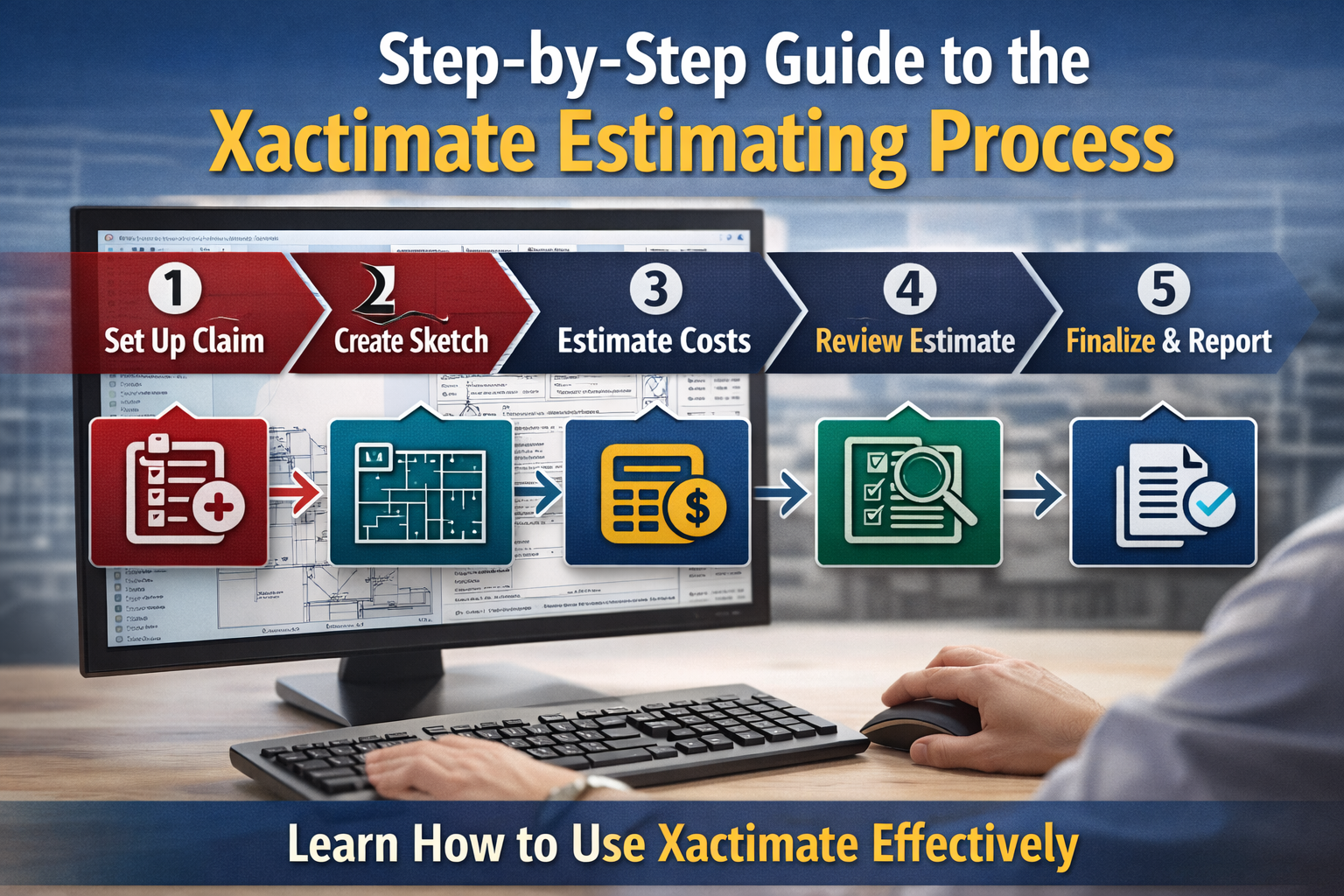
In the property restoration and insurance claims industry, accuracy and efficiency are essential. Whether dealing with water damage, fire restoration, storm repairs, or general reconstruction, professionals rely on advanced estimating software to create precise and standardized cost reports. One of the most widely used platforms in the industry is Xactimate.Understanding the Xactimate estimating process step by step helps contractors, adjusters, and restoration professionals produce accurate estimates, reduce claim disputes, and improve project profitability. This guide provides a detailed overview of how the Xactimate estimating process works, from project setup to final reporting.
Before diving into the process, it’s important to understand why Xactimate is widely used. The software is designed to.
Create standardized repair estimates
Use localized, updated pricing databases
Improve communication between contractors and insurance carriers
Minimize discrepancies in claim settlements
Provide detailed documentation for repairs
Because insurance companies commonly rely on this system, mastering its estimating workflow ensures smoother approvals and faster payments.
The first stage of the Xactimate estimating process involves creating a new project file. This step lays the groundwork for all cost calculations and documentation.
During project setup, estimators input.
Client and insured information
Property address
Insurance claim details
Date of loss
Type of damage (fire, water, wind, etc.)
Price list selection based on the project’s geographic location
Selecting the correct price list is critical. Xactimate uses region-specific pricing that reflects local labor rates and material costs. Choosing an incorrect location can lead to inaccurate cost projections.A well-prepared project file ensures that all future estimate items are aligned with the proper pricing database.
Accurate measurements are the foundation of a reliable estimate. In this step, the estimator creates a digital sketch of the affected property areas.
The sketching process includes.
Drawing room dimensions
Defining wall heights
Adding doors and windows
Including ceilings and flooring details
Identifying structural features
Xactimate automatically calculates square footage, linear feet, and surface areas based on the sketch. This automation reduces manual errors and ensures precise quantity calculations.For complex properties, detailed sketches help prevent overlooked areas that could otherwise result in underestimating material or labor requirements.
After creating the property layout, the next step is defining the scope of work. This involves identifying all necessary repairs, replacements, removals, and restoration tasks.
The estimator must carefully assess.
Damaged materials
Structural components
Affected systems (electrical, plumbing, HVAC)
Required demolition
Cleaning and mitigation needs
Each item added to the estimate corresponds to a standardized line item within the Xactimate database. These line items include material costs, labor costs, equipment expenses, and overhead components.A clearly defined scope prevents disputes and ensures that no required repairs are excluded from the estimate.
Line items are the core elements of the Xactimate estimating process. Each task or material is represented by a specific code within the software.
For example, estimators can add line items for.
Drywall removal and replacement
Flooring installation
Cabinet replacement
Painting
Roofing repairs
Debris disposal
Each line item automatically calculates labor hours, material quantities, and associated costs based on the selected price list.Accurate line item selection is essential. Choosing incorrect codes may result in underpayment or disputes with insurance carriers. Experienced estimators ensure that every repair task is documented using the most appropriate and detailed line item available.
Construction and restoration projects involve indirect costs beyond basic materials and labor. Xactimate allows estimators to include additional financial considerations such as.
Material waste factors
Overhead percentages
Profit margins
Sales tax
Permit fees
Overhead and profit (O&P) are particularly important in insurance claims. Proper justification for O&P ensures fair compensation for general contractor services and project management.By accurately applying these financial components, the estimate reflects the true cost of completing the project.
Xactimate updates its pricing databases regularly to reflect market fluctuations. Before finalizing an estimate, it is essential to verify that the most current price list is being used.Market shifts in material prices such as lumber, drywall, or roofing materials can significantly impact project costs. Using outdated pricing may lead to inaccurate estimates and claim disagreements.
Estimators should confirm.
The correct geographic region
The most recent pricing version
Any price adjustments required for special circumstances
Staying current with price list updates ensures financial accuracy and reduces negotiation conflicts.
Strong documentation supports faster claim approvals. Xactimate allows users to attach photos, notes, and supporting files directly to the estimate.
Helpful documentation includes.
Before-and-after photos
Moisture readings
Damage reports
Inspection notes
Material invoices
Clear documentation strengthens the credibility of the estimate and provides evidence for disputed items if necessary.This step enhances transparency and reduces back-and-forth communication between contractors and adjusters.
Before submitting the estimate, a thorough review is essential. Quality control helps eliminate errors that could delay claim approval or reduce payment.
During the review process, estimators check.
Measurement accuracy
Line item completeness
Duplicate entries
Missing tasks
Mathematical inconsistencies
Correct tax application
Careful review ensures the estimate is comprehensive and professionally presented.
Once the estimate is complete and reviewed, Xactimate generates a professional report. The report typically includes.
Cover page with claim details
Detailed room-by-room breakdown
Line item summaries
Pricing information
Sketch diagrams
Grand total
The estimate can be exported in multiple formats for submission to insurance companies, clients, or project stakeholders.A clear and organized report improves approval speed and enhances communication.
In many cases, additional damage is discovered after initial demolition begins. When this happens, the estimator creates a supplement.
A supplement involves.
Adding newly identified line items
Updating quantities
Revising the total cost
Providing additional documentation
Xactimate makes it easy to track revisions while maintaining transparency. Proper supplement management ensures contractors receive compensation for unforeseen damages without compromising documentation standards.
Adhering to a systematic Xactimate estimating workflow offers several advantages.
Improved estimate accuracy
Reduced claim disputes
Faster approvals
Better financial forecasting
Stronger professional credibility
When each step is executed carefully, the estimate becomes a reliable financial blueprint for the restoration project.
While Xactimate is a powerful tool, it requires expertise to use effectively. Proper line item selection, scope development, and documentation demand training and industry knowledge.Professional estimating services such as Universe Estimating assist contractors and restoration companies by preparing detailed, compliant Xactimate estimates that align with insurance standards. Their expertise helps ensure that no necessary repair items are overlooked and that estimates are structured for smooth approval.Outsourcing estimating tasks also allows contractors to focus on project execution rather than administrative documentation.
To maximize accuracy and prevent payment delays, avoid these common errors.
Using incorrect price list
Underestimating quantities due to poor measurements
Missing line items in the scope
Failing to include overhead and profit where applicable
Submitting estimates without supporting documentation
Avoiding these pitfalls enhances financial precision and project efficiency.
The Xactimate estimating process is more than just entering numbers into software it is a structured workflow designed to produce accurate, standardized, and defensible repair estimates. From project setup and property sketching to line item selection and final reporting, each step plays a vital role in ensuring financial clarity.By following a systematic approach, restoration professionals can reduce disputes, accelerate claim approvals, and maintain profitability. Whether handled in-house or through professional support, mastering the Xactimate estimating process is essential for success in today’s competitive restoration and insurance claims industry.A well-prepared Xactimate estimate does not just calculate costs it builds trust, ensures accountability, and sets the foundation for successful project completion.